
Routin Smart Route Planner
Routin IncMaps & Navigation
4.7437.00 Reviews
- Version
- 6.1.7
- Installs
- 1.00M
- Age Rating
- Everyone
Screenshots
Our Review of Routin Smart Route Planner
 Analysis by Appyee
Ever found yourself juggling multiple errands and thinking, "There must be a better way to plan these routes?" Enter Routin Smart Route Planner, an app that promises to streamline your day with efficiency and ease. Let me walk you through my experience with this nifty tool.
Why planning around a connection matters
A route planner is only as useful as the information it can access when you need it. With Routin, the parts of the experience that involve building a route and using current traffic information make connectivity an important consideration. I would prepare a complicated itinerary while I had a reliable connection, rather than waiting until I was already moving between stops to enter every destination.
That approach is especially useful when a day has several appointments with fixed arrival times. I can review the sequence before leaving, notice whether the route looks sensible, and make changes while I have the time to think. A planner can reduce the mental work of ordering stops, but it cannot remove the need to check that the addresses and timing suit the day.
I also treat live traffic as a helpful input, not a guarantee. Traffic conditions can change after a route is planned, and connectivity interruptions can make current information less dependable. If I have an important arrival, I leave room for delays instead of assuming that an optimized route will deliver an exact travel time.
Better suited to planned rounds than spontaneous wandering
The app’s strongest fit is a day when I already know several places I need to visit: a series of errands, a delivery round, or appointments spread across town. In that situation, deciding the stop order is a real task, and a multi-stop planner has a clear job to do. It is less compelling for a single destination, where the regular navigation app I already use may be quicker to open.
For a realistic Saturday, I might need to collect a parcel, buy groceries, and stop at a shop before heading home. I would enter the locations before setting off, check that each stop is correctly placed, then use the route plan to avoid choosing the order by guesswork. If the parcel counter has a closing time, I would put that constraint into my own planning rather than assume the app knows which errand must come first.
That last check is a useful habit: route order and personal priorities are not always the same thing. A route that looks efficient on a map may not account for opening hours, parking difficulty, a promised pickup time, or the fact that I need to carry chilled groceries only near the end. I would use the planner to help with geography, then apply everyday judgement to the rest.
Practical choices while using the app on the move
Routin is a planning tool, not a reason to handle a phone while driving. I would set up the stops and choose how to continue to navigation before the car moves, then rely on safe, lawful use of directions. If a stop changes, pulling over before editing the plan is a better trade-off than trying to make a quick correction in traffic.
Sending directions to Google Maps or Waze is useful because it lets me keep a familiar turn-by-turn navigation experience rather than forcing every part of a journey into one interface. The trade-off is that planning and navigation are separate steps: I need to make sure I have actually opened the chosen navigation app and selected the intended destination or route. I would not assume that switching services means every detail transfers exactly as I expect.
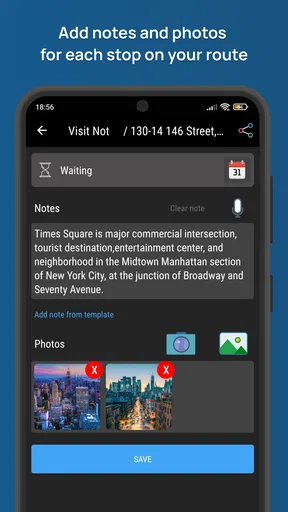
Before a long round, I would also look over the stop list for duplicates, misspellings, and ambiguous addresses. A wrong entry can make an otherwise sensible route frustrating, and checking it while stationary is much easier than discovering the problem at the curb. Saving regular places can reduce repeat typing, but it is still worth confirming that a saved location is the right branch or entrance when a business has more than one.
What to do when the plan needs rescuing
Unexpected changes are part of errands and delivery work: a customer may not be available, a shop may be closed, or I may decide to add a quick stop. The ability to adjust a route is helpful in those moments, but I would distinguish between changing the plan and receiving live navigation. If the connection is weak, I would avoid counting on fresh traffic information and make a cautious decision using the route and local signs I can see.
If an address fails to resolve or a route looks odd, I would first check the spelling and location pin, then try the entry again when the connection is stable. For a time-sensitive stop, I would keep its address accessible and have a familiar navigation option ready. That is not a claim that Routin works offline; it is simply sensible preparation for any trip where a phone signal or current map information may be unreliable.
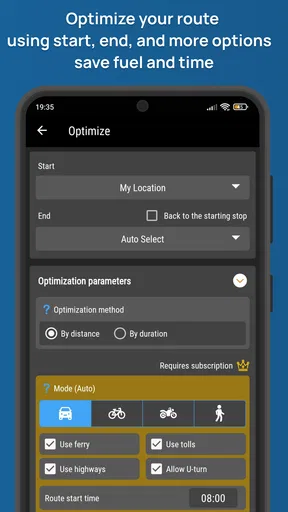
One practical trade-off is that route optimization can make a proposed order feel authoritative even when it does not know the reason behind each stop. I would override the suggested sequence whenever a real-world constraint matters more than distance, such as a closing time or a passenger who needs a break. The best result comes from letting the app handle the ordering problem while I remain responsible for the context.
Using data thoughtfully and choosing the right tool
Because route planning and current traffic are tied to map information, I would expect to use mobile data during connected parts of a journey. To keep use deliberate, I would plan and review the route before leaving, avoid repeatedly rebuilding it without a reason, and use a trusted Wi-Fi connection for preparation when convenient. Those habits are useful for anyone with a limited data allowance, though they do not guarantee that the trip itself will need no mobile connection.
Compared with opening a standard navigation app and entering each destination one at a time, Routin is more appealing when the main challenge is arranging several stops into a sensible round. A regular maps app may be the better choice for one-off directions, exploring nearby places, or a trip where I want to search and navigate in the same familiar place. For a large work route with strict scheduling or specialist fleet requirements, I would also check whether a dedicated work system fits better than a general-purpose planner.
Getting Started with Routin Smart Route Planner
When I first downloaded Routin Smart Route Planner, I was curious about how intuitive it would be. The installation was smooth sailing, and I was greeted with a clean, user-friendly interface. It didn’t take long to set up my first route, thanks to the handy tutorials and tips that pop up as you navigate the app for the first time.
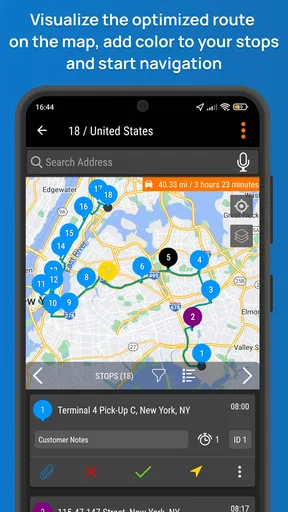
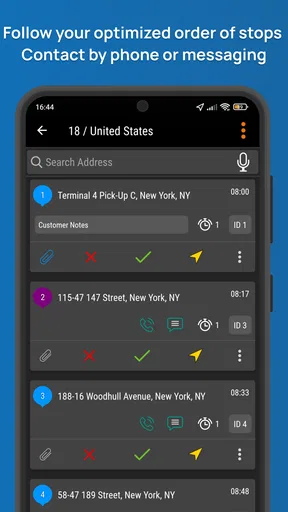
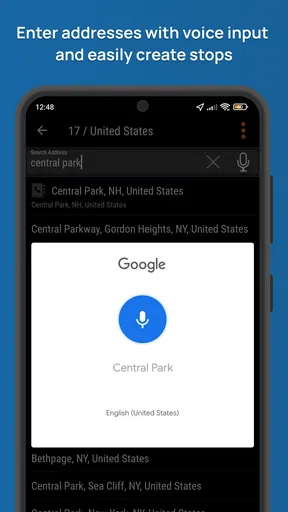
The app is designed to make your life easier by optimizing the routes you take, whether for errands, deliveries, or road trips. You simply input your destinations, and voilà! The app calculates the most efficient path, saving you time and fuel.
Key Features That Stand Out
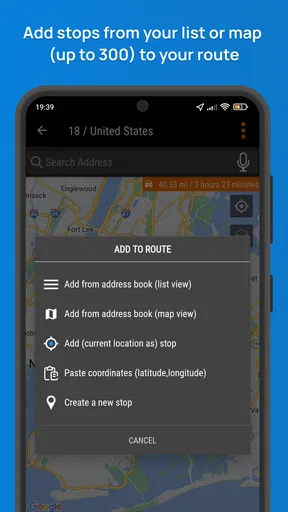
One of the standout features for me was the ability to add multiple stops along the way. Not only does it optimize the sequence of your destinations, but it also adjusts on the fly. If you decide to make an impromptu stop for coffee or a quick detour, the app recalibrates seamlessly.
I also appreciated the real-time traffic updates. No one enjoys getting stuck in a jam, and with Routin, you’re always a step ahead. The app pulls in live traffic data to reroute you as needed, keeping your journey smooth.
"The flexibility and adaptability of this app are what set it apart from the competition."
Another feature worth mentioning is the integration with Google Maps and Waze. This means you’re not tied to one navigation system, and you can choose your preferred map service for turn-by-turn directions.
Personal Experience Using Routin
During my week-long test drive, I tasked the app with various challenges. From running daily errands to planning a weekend getaway, Routin handled it all with finesse. I was particularly impressed with how much time it saved me on a busy Saturday morning of grocery shopping and post-office runs.
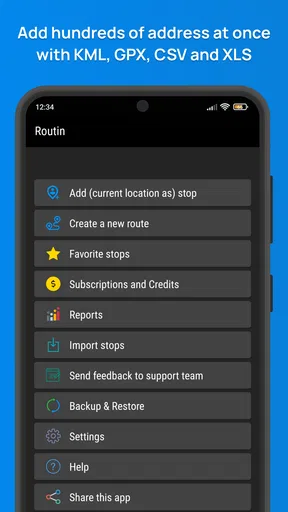
What I really loved was the app’s ability to save frequently visited locations. This feature is a game-changer for someone like me who often visits the same places. With just a tap, I had my route planned without needing to re-enter addresses.
The App’s Impact on Daily Life
Routin Smart Route Planner has undoubtedly made my logistics more efficient. It's like having a personal assistant in your pocket, and who doesn’t want that? The time saved can now be spent on more meaningful activities, whether that’s catching up with friends or indulging in some much-needed relaxation.
Moreover, the app’s sleek design and ease of use make it accessible for anyone, tech-savvy or not. It’s an app designed for everyone, from busy parents to delivery drivers, and it performs remarkably well across the board.
Final Thoughts
All in all, Routin Smart Route Planner lives up to its promises. It’s not just another app on my phone; it’s a tool I genuinely rely on. The combination of smart technology, real-time updates, and user-centric design makes it a must-have for anyone looking to bring more efficiency and less stress into their day-to-day life.
If you’re tired of spending unnecessary time on the road, give Routin a try. Who knows? It might just be the app you didn’t know you needed.
Who will get the most from it
In the maps and navigation category, Routin Planner stands out for people who need to sequence destinations, not merely find one. I would recommend it to anyone who regularly visits several places in one outing and finds manually comparing possible orders tedious. A local courier, a home-service worker, or a parent combining school pickups with errands can all benefit from having the route order worked out in one place.
It is a less obvious fit for someone who rarely makes more than one stop, prefers to discover destinations as they go, or needs a navigation system built around complex job dispatch and fleet controls. In those cases, a standard map app may feel simpler, while a specialized work platform may better match the workflow. Routin is most valuable when route sequencing is the specific headache.
The app is free to download, with optional in-app purchases ranging from $2.99 to $11.99 per item. I would begin with the free experience and decide whether any paid option is worth considering only after I know how often I plan multi-stop routes. Its Everyone content rating makes it suitable for a broad audience, but the practical question is whether the planning tools match your routine.
Small planning habits that prevent bigger delays
My most useful tip is to treat the stop list as a checklist before treating it as a route. Add destinations in a calm moment, verify each location, and then review the suggested order against the purpose of the trip. This catches the kind of quiet mistake that route optimization cannot fix: choosing the wrong branch, overlooking a pickup deadline, or including a stop that has already been completed.
For recurring rounds, saved locations can cut down on address entry, but I would still check the pin each time the destination is unfamiliar or has multiple entrances. A business address may point to a building rather than the customer entrance, and a delivery may need a specific access point. That quick visual check can matter more than shaving a little distance off the route.
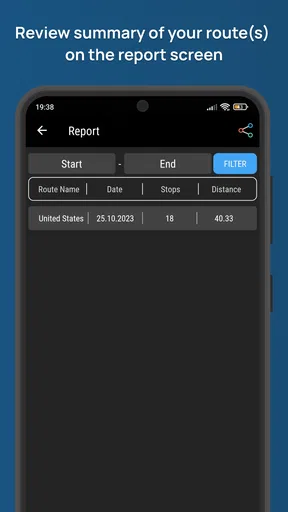
I would also separate route planning from stop management. A planner can help decide the order, but I still need to keep track of which errands are finished and which items must stay in the car. For groceries, for example, putting a food shop last may be more practical than following the shortest loop. That is a small example of why the best route is not always the shortest-looking one.
What the ratings and cost suggest
Routin is developed by Routin Inc and has a 4.7 average from around 25,000 ratings, alongside roughly 425 written reviews. It has over 1 million installs, which suggests that multi-stop planning is a well-established use case rather than an unusual niche. I would treat those figures as useful context, not proof that the app will suit every device, region, or route.
The current version is 5.1.5, and the app requires Android 8.0 or later. That matters if you are installing it on an older phone: check compatibility before building it into a work routine. A planner is only dependable in practice if the phone you carry can run it comfortably and can access the map information your journey needs.
For regular use, I would try a low-pressure route first rather than making the first test a day with strict arrival times. That gives you a chance to learn how you prefer to enter destinations, how route changes fit your habits, and whether handing directions off to Google Maps or Waze feels natural. Once that workflow is comfortable, it is easier to judge whether the app genuinely saves effort on a busy day.
A measured verdict on staying connected
The balance I like is to let Routin handle the multi-stop puzzle, then use judgement for timing, access, and unexpected changes. Its traffic updates and ability to adjust a route can be valuable when conditions shift, while the links to familiar navigation apps make it easier to continue with a service you already know. Neither benefit removes the need to check the plan or prepare for a connection hiccup.
If your routine involves several destinations and you are comfortable planning with map services, Routin is worth trying. If you mainly need turn-by-turn directions to one place, your usual navigation app may already be enough. For me, the deciding question is simple: do I spend more time figuring out the order of stops than following directions? When the answer is yes, this planner has a clear role; when it is no, adding another app may not improve the day.
Verdict
Strengths of Routin Smart Route Planner
- Easy-to-use interface for quick navigation.
- Offers real-time traffic updates.
- Customizable route options available.
- Integrates well with calendar apps.
- Supports offline maps for no-signal areas.
Limitations of Routin Smart Route Planner
- Occasional inaccuracies in traffic data.
- Limited support for public transport routes.
- Battery drain on prolonged use.
- Requires frequent updates for accuracy.
- Premium features behind a paywall.
Similar Picks in This Category
View All
Uber - Request a ride
Uber Technologies, Inc.4.7


inDrive. Rides with fair fares
® SUOL INNOVATIONS LTD4.8

Yandex Go: Taxi Food Delivery
Mikromobilnost LLC Belgrade4.8

Bolt: Request a Ride
Bolt Technology4.8

Rapido: Bike-Taxi, Auto & Cabs
Rapido Bike Taxi4.8
Frequently Asked Questions
What is Routin Smart Route Planner and how does it work?
Routin Smart Route Planner is an app designed to optimize travel routes for multiple destinations. It uses advanced algorithms to analyze traffic, distance, and time, ensuring the most efficient paths. Users input their stops, and the app provides the best route, saving time and fuel. It's ideal for travelers, delivery drivers, and anyone needing to manage multiple stops efficiently.
Is Routin Smart Route Planner available on both Android and iOS?
Yes, Routin Smart Route Planner is accessible on both Android and iOS platforms. This ensures a wide range of compatibility, allowing users to benefit from its features regardless of their device preference. The app can be downloaded from the Google Play Store for Android users and the Apple App Store for iOS users.
Does Routin Smart Route Planner require an internet connection to function?
While Routin Smart Route Planner primarily relies on an internet connection for real-time traffic updates and map data, it does offer some offline functionalities. Users can pre-download maps and routes, which allows for navigation in areas with limited connectivity. However, for optimal performance, a stable internet connection is recommended.
Are there any subscription fees or in-app purchases associated with Routin Smart Route Planner?
Routin Smart Route Planner offers a free version with basic features. However, for enhanced functionalities like advanced routing options, ad-free experience, and additional tools, users can opt for a premium subscription. These in-app purchases are designed to cater to users who require more comprehensive route planning capabilities.
How secure is the data I input into Routin Smart Route Planner?
Routin Smart Route Planner prioritizes user privacy and data security. The app employs encryption to protect user data and adheres to strict privacy policies. Personal and location information is used solely to enhance user experience and is not shared with third parties. Users can review the app’s privacy policy for detailed information on data handling practices.
